By MagzSoftware
Friday, March 9, 2012
There're many softwares out there that offer features for optimization, recovery, and computer maintenance. But the software that will be discussed this time is the software that you should consider. I think this software is an extra-ordinary software that provides a very comprehensive services. Why.? Because this software combines two sophisticated suites as well.
In my previous review I've discussed the
WinSuite 2012 which has any emphasis on some functions such us PC Clean & Tuneup, Data Recovery, Password & Key Finder, Disk Manager, and Privacy & Security. There was also
LiveBoot 2012 which has main features on Windos Recovery, Password & Key Finder, Data Recovery and Disk Management. Although both of them have the same features, but specifically LiveBoot 2012 has Boot Up function that provides a complete solution to solve Booting Problems and Windows Crash.
And as I mentioned earlier, that
Wondershare has released a highly sophisticated suite, by combining WinSuite 2012 and LiveBoot 2012 to be a very powerful suite.
Power Suite Golden 2012 is a very smart combination which provides a very complete Windows solution. Power Suite Golden 2012 can be your best choice to free you from all troubles like slow computer, black / blue screen, computer crash, system errors, data / password lost, etc.
 |
| Power Suite Golden 2012 |
Key Functions of this Power Suite Golden 2012 :
- Bootable CD/USB - Boot up any crashed computer with bootable CD/USB. Rescue Windows & hard drive - Rescue crashed Windows or hard drive rapidly and effortlessly.
- PC Clean & Tuneup - 360° PC health check with 1 click to scan and diagnose your computer and optimize & speed up PC performance.
- Data Recovery - Recover different kinds of deleted or formatted data from various disks, such as USB drive, external hard drive, mobile phone, digital camera, iPod, and other storage media.
- Password & Key Finder/Reset - Find your Windows & Office product keys when you need to reinstall them, as well as passwords for your Gmail, Yahoo, Outlook, etc. when you forget them. Also, reset administrator’s or user’s password.
- Disk Manager - A complete disk management solutions for partition management, disk/partition cloning, disk/partition wipe, and more.
- Privacy & Security - Protect your privacy and ensure data security by creating personal safe place, erasing "footprints" on Windows and online, shredding or encrypting files.
What's New in Version 7.0.1 :
- Added a PowerSuite Golden downloader for fast download;
- Upgraded the WinSuite 2012.
- Upgraded the LiveBoot 2012.
For more information about
Power Suite Golden 2012 you can visit
Wondershare, and then you can learn its advanced features for details. But, I really recommend this suite than you only use WinSuite 2012 or LiveBoot 2012. With its complete featutres, you feel free to fix any problems with your computer.
System Requirements :
- Processor: 800MHZ or above (1GHZ is recommended)
- Memory: 512MB or above (1GB is recommended)
- Video Card: 1024*768 monitor resolution (1024*768 monitor resolution is recommended)
- Optical Drive: CD-ROM drive
- Supported OS: Windows7/XP/2003/Vista (32/64 bit)
The required hardware for booting LiveBoot :
- Processor: 800MHZ or above (1GHZ is recommended)
- Memory: 512MB or above (1GB is recommended)
- Video Card: 1024*768 monitor resolution (1024*768 monitor resolution is recommended)
- 32MB video memory
- Optical Drive: CD-ROM drive
- USB Flash Drive: USB flash drive
By MagzSoftware
Tuesday, March 6, 2012
A Hard Drive (also Hard Disk, Disk Drive, or HDD) is a cornerstone hardware / device of a computer or laptop. This device serves to store and retrieve digital information, primarily computer data. It consists of one or more rigid rapidly rotating discs or commonly called as platters, coated with magnetic material and a magnetic head arranged to write data to and read from their surface. Inside the hard drive the operating system you use is installed. Without hard drive you can't run window or any other programs. Since its introduction by IBM in 1956, hard drive technology has experienced a remarkable evolution, the greater capacity but low cost.
 |
| LiveBoot 2012 |
I don't want to make wide discussion about this hard drive, because I think all of us already know how important the hard drive in a computer or laptop. That will be our spotlight are the problems that occur on our hard drive so that we can't run windows. What would you do when your hard drive was crashed or for some reason you couldn't run your windows.? Make any curse words..?? LOL..;). I think it's not going to change situation, because you still can't use your computer or laptop, can you?
Here is the good news for you.! No matter your computer/hard drive is crashed, doesn't boot at all, or can't get into Windows for any reason
LiveBoot 2012 from
Wondershare can take them all. It is integrated with the latest
Microsoft WinPE 3.0 technology. LiveBoot 2012 is an All-In-One boot disk providing 40+ tools to meet all emergency repair and maintenance needs for your computer. This bootable CD/USB drive allows you to boot up any computer, as well as fix computer booting problems, recover Windows, rescue data, partition or clone disk, wipe data and more, over 40+ utility functions in total.
 |
| LiveBoot 2012 - Main Interface |
Main features LiveBoot 2012 :
- Windows Recovery - This boot disc provides a complete solution set for all Windows crash and booting problems including booting failure, virus infection, blue/black screen, and more.
- Password & Key Finder - This boot CD/USB for Windows can help to reset Windows password when you forget the login password and find Windows or Office product key when you want to reinstall them.
- Data Recovery - This bootable disk can rescue any data from your internal/externall hard disk or partitions no matter deleted, formatted, or whole disk corrupted, including documents, archives, emails, photos, videos, and audio files.
- Disk Management - This DOS boot disk offers complete disk management solutions including partition management, disk/partition cloning, disk/partition wipe, and more.
What's New in Version 7.0.1 :
- Adopted the latest WinPE 3.0;
- Intergrated with Internet Explorer and Open Desk Top;
- Intergrated with Wondershare Disk Manager Free 1.0.1;
- Intergrated with Wondeshare Data Recovery 2.0.2;
- Intergrated with upgraded Spotmau BootSuite 6.0.1;
- Intergrated with some Microsoft Utility;
- Use the new name - Wondershare LiveBoot 2012, to replace Spomtau BootSuite 2011;
- Improved the functions of each function module;
- Added a downloader to speed the downloading 5X;
- Added the function of affiliate customizing;
- Upgraded the USB Burner;
System Requirements :
- Processor: 800MHZ or above (1GHZ is recommended)
- Memory: 512MB or above (1GB is recommended)
- Video Card: 1024*768 monitor resolution (1024*768 monitor resolution is recommended)
- Optical Drive: CD-ROM drive
- Supported OS: Windows7/XP/2003/Vista (32/64 bit)
The required hardware for booting LiveBoot :
- Processor: 800MHZ or above (1GHZ is recommended)
- Memory: 512MB or above (1GB is recommended)
- Video Card: 1024*768 monitor resolution (1024*768 monitor resolution is recommended)
- 32MB video memory
- Optical Drive: CD-ROM drive
- USB Flash Drive: USB flash drive
Some features found in
LiveBoot 2012 are similar with
WinSuite 2012, but the primary function is still to resolve the problem booting on damaged hard drive. The user-friendly interface simplifies the complicated repair procedures into only a few clicks for both savvy users and newbie. Let your crashed PC easily boot from CD/USB now! And for more information about advanced features of this sophisticated tool visit
Wondershare.Com.
By MagzSoftware
Saturday, March 3, 2012
You must agree that a slow computer is very boring. Definitely a lot of factors that cause it can happen. In addition to hardware problems that are not able to work optimally, it can also be caused by other things such as star-up the overload, spyware, corrupted registry, bad hard drive fragmentation, poor security software, remnants of uninstalled programs, the page file, too many windows and temporary files, viruses, etc.
 |
| WinSuite 2012 |
In addition you will also bothered if you lose your data, privacy leaked, or forgotten password. The question is how much time should you spend to make the diagnosis of all these problems.? Or instead you will feel stress.? But don't worry, if you use
WinSuite 2012 you will be able to handle all the problems we mentioned earlier easily. You don't need to spend much time because WinSuite 2012 can fix them all for you in minutes.
Main features of WinSuite 2012 :
WinSuite 2012 has many features for the maintenance of your windows, they're include:
- PC Clean & Tuneup - WinSuite 2012 allows you do 1-click PC Health Check with 360° scanning system, diagnose your PC and provide detailed suggestion on system performance optimization according to the detection. This suite also can speed up your windows, optimize windows startup items, windows service items and Internet items. And if you had any problems with windows registry, you can use WinSuite 2012 to scan and clean the registry, keep it thin and safe, clear junk files to make the computer run fast, strengthen the security of Internet activity, erase computer footprints to protect privacy, uninstall stubborn software and remove unused plug-ins to make your browser faster.
- Data Recovery - This tool allows you to recover different kind of files fully, such us documents, archives, emails, photos, videos and audio files with preview before recovery. You also can recover data deleted by Shift + Delete or emptied from Recycle Bin, lost from corrupted or formatted partitions. And this is another greatness of this tool, you can recover data from various devices, retrieve them lost from internal hard drive, USB drive, external hard drive, mobile phone, digital camera, iPod, MP3/MP4 player, and other storage media.
- Password & Key Finder - Password Finder allows you to find out almost all hidden passwords for your Windows Live, MSN, Hotmail, Outlook, Gmail, Yahoo, Windows auto logon, IE AutoComplete, dial-up and more. Moreover, you can find your Windows product ID and key for your reinstall. Don't hesitate because you can find Office key back too (for Office 2000, XP, 2003, 2007 and 2010).
- Disk Manager - Making cloning disk / partition is no longer a difficult issue, because with WinSuite 2012 you can clone partitions or the entire disk including Windows, programs, files and personal settings to another partition or disk. Organize your partition or disk effectively by resizing, deleting, formatting, hiding, splitting or merging. WinSuite 2012 facilitates you to do easy backup & restore file, folder, partition or disk for 1-click restore when they are lost or damaged.
- Privacy & Security - WinSuite 2012 can create a “personal safe” place on the disk for personal stuff that you are the only person allowed to access. With its privacy cleaner you can make securely delete online Internet tracks and program activity records stored in your browser, recent documents and records on the hard drive, start menu, etc. Moreover, you can encrypt your personal data to stop unauthorized access, or permanently shred files beyond recovery even with recovery software.
 |
| WinSuite 2012 Interface |
What's New in Version 7.0.1 :
- New interface providing a better user experience;
- Integrated with Wondershare Data Recovery 2.0;
- Integrated with Wondershare Disk Manager Free 1.0;
- Integrated with Wondershare 1-Click PC Care 7.4;
- Upgraded Password Finder function and supported IE 7/8/9;
- Fixed some minor bug for better using.
System Requirements :
- Supported OS: Windows 7/Vista/XP 32/64 bit
- Processor: >750MHz Intel or AMD CPU X86(32bit) or X64(64bit)
- Free Hard Disk Space: 1GB or more
- RAM: 512 MB or above
So according to my conclusions, WinSuite 2012 is perfect suite for your computer who need extra care. With its complete features makes WinSuite 2012 is one of the suites are quite powerful and I recommend it to you.
By MagzSoftware
Tuesday, January 31, 2012
Your computer is like a small office but can do so much work. Activities that you do using a computer, whether it be offline or online course will cause changes in the configuration of the operating system (i.e. Windows) you use. These changes are caused by several factors, for example if you frequently install or uninstalling software on your computer, it would surely have caused a change, one of which is a registry. Keep in mind the process of uninstalling which do usually still leave Unwanted registry, and if it is allowed to continue will create an increased burden on your computer's memory. So do not be surprised if many users are always install a registry cleaners that they can use for regular registry maintenance.
| Wondershare Time Freeze 2.0 |
Another example, configuration changes on the operating system is often due to carelessness in the use of computers, whether it be working offline and online that doesn't mean secure against virus threats. It is very important to get our attention, therefore, attach your favorite anti-virus, in order to minimize the threats. A more severe threats could also come up when you use your computer for online activities, among others, the threat of viruses, spyware, trojans, and other malware attacks.
It is undeniable that the use of computers is now oriented towards online activities. One fact is, you can't socialize with other peoples by using Twitter or Facebook if you're not online can you.? And remember comrades, security threats to your computer can also be started from social networking as I mentioned. This is my story, I often get the fake links on Facebook that contain viruses, spyware or other types of malware. Therefore, be careful if there is someone who sends you a particular link (e.g. download link) or ads link to your facebook wall, you don't make directly click on that link, please be sure that the links are safe.
Well, it would be too long if we talk about the threats. Now our task is how to increase healthy behaviors in using the computer either online or offline. In addition to installing antivirus, we can also choose other third party software as an alternative that can secure our computer systems.
This time we will review on Time Freeze 2.0. Time Freeze 2.0 is a software that can be used by users that aims to minimize the threat to their operating system. The interesting thing is the Time Freeze 2.0 can be a virtual system software that can create a virtual environment. Users who make any activities through this virtual environment will make the real system more secure. Only with 2 clicks and without rebooting, you already enter a virtual system, so you don't to worry while surfing on the internet. With this virtual system you can also evaluate each application and do whatever you like as on the real system, while in the real system remains safe, no change at all.
Time Freeze 2.0 is not like any other antivirus software, but when you do your activities with this virtual system, the threats such us viruses, spyware, worms, trojans and other will not happen to your real system. When you reboot you computer, all data produced by this virtual system, such as those infected with viruses, spyware, trojans and internet history will vanish like nothing has happened. Time Freeze 2.0 is a fortress which is outside of the fort else that can make real system in your Windows becomes more secure.! The other advantages of Time Freeze 2.0 include:
- New Physical Memory Buffer Mode: when users enable System Protection in Time Freeze 2.0, they can apply this Physical Memory Buffer Mode, which can first speed up virtual system performance at least 60%, and second minimize the frequency of writing/reading hard disk and prolong its service life.
New MBR protection: protect the boot sector of the main hard disk to guarantee the normal startup of computer.
New USB protection: prevent virus/malware threats from USB sticks to infect your computer, and prevent authorized users to copy your important files using USB sticks.
Improved Folder Protection: the software kernel of Folder Protection is rewritten in order to bring stronger defense against threats of virus/spyware and keep protected files safe and clean.
Auto hide system tray icon: annoyed by the flashing system tray icon? It is gone in Time Freeze 2.0. Users can also press hot key (Ctrl+Alt+F8) to hide/show the icon.
Revolutionary new interface: the interface of Time Freeze 2.0 is a completely new design with the same logic and improved intuitiveness and appearance.
More flexible options: with Time Freeze 2.0, it is more flexible to save/discard virtual system data when return to the real system; it is also possible to set different protection mode for different folders.
Virtual system as the shadow of the actual system.
Simply reboot computer to return to the original state. Eliminates cost for system maintenance.
Surf internet safely, and play around with computer with NO trace left.
Manage the program with a custom password setting and keep inexperienced users from making change to your settings and configures.
Siytem Requirement :
- Another advantage of the Time Freeze 2.0 : While Time Freeze 1.0 is only compatible to 32-bit OS, Time Freeze 2.0 added support to 64-bit OS including Windows 7, XP, Vista and Windows 2000, so as to satisfy users of 64-bit OS.
So many advantages already mentioned above when you use Time Freeze 2.0. Although it doesn't support yet for other operating systems like Mac and Linux, but you can try it. Please visit the vendor of Time Freeze 2.0 and download it for free trial.
By MagzSoftware
Friday, January 27, 2012
In the first time, when you install the operating system in your PC, it is usually installed automatically default web browser, e.g Internet Explorer on windows 7. But often, with variety of reasons, you can install more than one web browser. You should know, there are two of my favorite web browser, i.e Mozilla Firefox and Google Chrome, because they are faster than Internet Explorer.
Keep in mind, the web browser is likely to be one of the most heavily used programs on a typical Internet connected computer. A web browser is quite a complex program. Among other things, it has to ;
- Handle a variety of formats, such as HTML code, images and scripting languages such as java script, and convert them to a form that humans can easily understand.
- Use your Internet connection to access the computer where the requested web page is stored and display a copy of it.
- Allow the user to download programs from the Internet.
Given this heavy workload and complexity, it is not surprising that web browsers are a common source of computer problems. And what if there are problems in your web browser.? Or, what if there are conflicts with your web browser and you losing your web browser profile settings ? Now, you don't need to worry because with zebNet Browser Backup 2012 you can solve that problems, so you don't need to reinstall your web browser. zebNet Browser Backup 2012 is the backup solution for users that easily want to back up and recover their entire web browser profile.
 |
| zebNet Web Browser Backup 2012 |
zebNet Browser Backup 2012 features and benefits :
- It automatically detects whether browser is installed on your computer, therefore avoiding the need for complicated settings.
- Saving up to 70% of your valuable disk space by automatically compressing the backup files, so that there is no need to worry about the disk space it will occupy.
- The backup files can be protected from unauthorized access by an industry-leading 256-Bit AES encryption by simply entering a password of your choice.
- Allowing you to easily browse through existing backup files just as easily as with Windows Explorer, which enables you to restore single specific files.
- Facilitating an automatic backup system with which you can back up all your web browser profiles on a regular basis - daily, weekly or monthly so that your backup files are always up to date.
- Delivering with the integrated backup guard continuous data protection (CDP) for your web browser profiles. This means that a new backup can be automatically created every time when closing web browser.
- It will make a complete backup of all your profiles including your bookmarks, passwords, personal settings, add-ons and much more.
- Creating cross-platform backup files which makes it incredibly easy to move all your web Browser settings without any problems or adjustments from one computer to another, even if it has a different version of Microsoft Windows and/or web browser installed.
- It is very flexible as it is and is even able to create self-restoring backup files as well as reserve copies of the backup files in a different location and FTP offsite copies.
- You can easily create a portable version of zebNet web browser 2012 to use it on other computers wherever you are.
- It is compatible with portable editions of web browser and is even able to create a portable edition ofweb browser with your local profile directly on a USB flash drive.
- It has a lot of powerful and useful features and is easy to use as it is completely self-explanatory. This program is also well suited for more novice users.
- It is designed to protect you as much as possible and is one of the leading backup solutions for web browser worldwide.
zebNet Browser Backup 2012 comes in six kind of browsers ; zebNet Firefox Backup 2012, zebNet Chrome Backup 2012, zebNet Internet Explorer Backup 2012, zebNet Opera Backup 2012, zebNet Safari Backup 2012, zebNet SeaMonkey Backup 2012. For the full version you can purchase zebNet Browser Backup 2012 according to the type of browser you use, or you can download its trial version.
By MagzSoftware
Thursday, January 26, 2012
You will be frustrated when you lost your important files within our PC, especially this is could be happen due to accidently mistakes. In some cases, if you used Window 7, you can restore your accidently modified or deleted files (click here for details explanation).
 |
| Power Undelete Wizard |
Then what if the window recovering tips are still not working.? Actually, lost or deleted files are not caused by accidently mistakes only. There are others factors such us viruses, trojans, spywares, they are potentially make you files or data gone.
Then, how we can solve this problem.? The best option that you can choice is using third party recovering software. There are many similar softwares that you can use to recover your deleted files. But I can't tell you which is the best one than the others. I think every computer users should have enough comprehension and experiences in this terms. But in this oppurtunity, I want you to consider one of this recovery software. It is Power Undelete Wizard.!
Power Undelete Wizard is an easy-to-use, windows based application designed for recovering deleted files from NTFS or FAT32 volumes. It even can recover files from formatted or reformatted disk. It can scan disk and find lost files and data blocks, these lost files may be deleted by mistakes, viruses, trojans, spywares, or other applications running on your PC. Power Undelete Wizard has step-by-step interface that will guide you through several stages of data recovery. You will get your deleted or lost files back in minutes.
With 3 simple steps you can recover your lost files easily and quickly, install Power Undelete Wizard on your PC and follow 3 simple steps below (look at the screenshots).
 |
| Step 1 - Scan Your PC for deleted files |
 |
| Step 2 - Select disk from which you have to recover data |
 |
| Step 3 - Select files and folders you want to undelete |
There are two version of this software, namely Power Undelete Wizard (Lifetime License) which allows the Unlimited Usage within youself and Free Lifetime Upgrade. Power Undelete Wizard (Unlimited License) gives you Unlimited Usage within one company and Free Lifetime Upgrade.
Features & Recovery Ability :
- Support NTFS and FAT32 volumes.
- Support removable devices.
- Support large size hard drives.
- Support localized and long filenames.
- Support IDE / SATA / SCSI / ATA hard disk drives.
- Support external ZIP drives and USB hard drives.
- Support Windows 7, 2000, XP, NT, 2003, Vista.
- Recover files deleted from the Recycle Bin.
- Recover files from deleted, damaged, formatted or reformatted partitions.
- Recover office document, photo, image, video, music, database, etc.
- Ability to resume last scan result.
- Ability to preview image and ASCII data.
- Easy-to-use interface. No special skill required.
- Is a read-only utility that does not damage data on the media in any way.
- No temporary files and no virtual memory, try to protect original data from being destroyed.
System Requirements :
- Intel or AMD CPU 300MHz or higher.
- At least 128MB RAM or SDRAM memory.
- 10MB free space to install the software, or run it on a CD, DVD, ZIP, USB disk, etc.
Purchase Power Undelete Wizard (Lifetime License)
Purchase Power Undelete Wizard (Unlimited License)
By MagzSoftware
Thursday, January 5, 2012
In a split second, you could lose all your photos, videos, emails, programs, critical files and shortcuts. But thanks to
Acronis True Image Home 2012, every bit of data can be recovered and your entire system can be restored to its original shape, quickly and easily.
Backup software has certainly been around for a long time but for those people not an IT pro the software has been challenging to setup and sometimes difficult to use.
Acronis True Image Home 2012 changes that as it is both powerful and is easy to use.
 |
| Acronis True Image Home 2012 |
Acronis True Image Home 2012 gives you flexible, user-friendly ways to back up your data on a regular basis. So if disaster strikes, you get it back quickly. It not only recovers all your data but, thanks to full-image backups, it can put everything back exactly where it was. That means all the same files in the same folders. The same applications and Operating System. The same icons and shortcuts. All your precious photos and videos. All your important work. Everything back to normal like it never happened!
Acronis True Image Home 2012 has great features to set it up and then forget it until you need it with automated scheduled backups that will not get in the way of you using your computer. True Acronis True Image Home 2012 can also remove all your data from a hard drive that you are ready to give away or discard.
Use intuitive graphical user interface to easily define where you’ll be backing up your PC and how often. Create copies of your hard drive with just a few quick steps while continuing to work. If you lose an important file or need to recover an earlier version of it, don’t worry: you can go back in time to retrieve it in seconds.
Acronis True Image Home 2012's features :
- Fast and Easy Backup and Recovery - Acronis True Image Home 2012 provides complete system image backup and recovery of your home PC's operating system, applications, settings, and personal files
- Continuous Data Protection- Acronis Nonstop Backup automatically creates incremental backups every five minutes allowing users to roll back their systems, files, and folders to any point in time in the past; Now compatible with NAS devices
- Syncronize any digital content - Replicate your documents, videos, photos, and any other digital content between multiple locations(License required for each syncronized machine)
- Large disk support (2+ TB) and full support of latest UEFI hardware technology
Systems Requirements :
- Platform : Windows 7 all Editions, Windows Vista all Editions SP2, Windows XP Home Edition (X32, SP3), Windows XP Professional (X32, SP3), Windows XP Professional (X64, SP2)
- Hard Disk Drives
- Networked Storage Devices
- FTP servers
- CD-R/RW, DVD-R/RW, DVD+R/RW, BD-R
- ZIP®, Jaz® and other removable media
- PATA (IDE), SATA, SCSI, SAS, IEEE1394 (Firewire), USB1/2.0/3.0 drives
- Windows Dynamic Disks and GPT volumes support available with Plus Pack add-on.
Download Acronis True Image Home 2012
By MagzSoftware
Thursday, December 29, 2011
Titanium Maximum Security 2012 is All-in-one security software. It provides maximum protection for everything you do online. It's your all-in-one security solution for protecting you, your devices and your data. Moreover,
Titanium Maximum Security 2012 is strong, fast and easy to use.
 |
| Titanium Maximum Security 2012 |
Titanium Maximum Security 2012 uses cloud-base techonology. It means you're not to worry about the threats because this technology can stop them proactively before they reach you. The latest features of
Titanium Maximum Security 2012 is Social Networking Security. This feature can automatically shows you what links are safe or malicious on sites like Facebook and Twitter.
Titanium Maximum Security 2012's Features :
- Essential Protection : Antivirus & Antispyware, Fake Antivirus Cleaner, Unauthorised Change Protection, and Personalise Titanium Interface
- Social Network Security : Facebook, Twitter, & Myspace Protection
- Mobile Protection : Supports Android, Symbian, iOS and Window®
- Surf The Web Safely : Web Threat Protection, Spam Blocker,Windows Firewall Booster
- Protect Your Children Online : Parental Controls
- Maximise Your PC's Performance : System Tuner
- Prevent Data Loss & Theft : Data Theft Prevention, Secure Erase, Trend Micro Vault, Safesync Online Backup (10 GB)
- Connect & Search Securely : Wireless Authentication, Trend Micro Toolbar
Full System Requirements :
- Windows® 7 Family (32 or 64-bit), CPU: 800 MHz (1 GHz recommended), Memory: 1 GB, Disk space: 500 MB
- Windows Vista® (32 or 64-bit), Service Pack 1 or higher, CPU: 800 MHz (1 GHz recommended), Memory: 512 MB (1 GB recommended), Disk space: 500 MB
- Windows® XP Family (32-bit only), Service Pack 3 or higher, CPU: 350 MHz (800 MHz recommended), Memory: 256 MB (512 MB recommended), Disk space: 500 MB
Download Titanium Maximum Security 2012
By MagzSoftware
Recovery Toolbox for Zip is used to recover files from corrupted ZIP archives. The program scans the archive, detects the data structure and tries to recover as much information from the corrupted file as possible. Using several different recovery algorithms, the tool makes it possible to achieve the minimal loss of useful data stored in the corrupted archive. Also, it checks data integrity, which allows it to increase the quality of recovery. The zip recover program shows the full data recovery report during its operation.
 |
| Recovery Toolbox for Zip |
The intuitive and comfortable interface allows even an inexperienced user to work with the program easily. Besides, the recovery process consists of several steps. Each of them is performed in a separate window after the previous one, which makes working with the program still easier.
Recovery Toolbox for Zip is able to: - Repair encrypted data from ZIP archives - Repair self-extracting (SFX) files - Repair ZIP files larger than 2 GB - Restore ZIP files from damaged media (floppy disks, CDs, DVDs, Zip drives, etc.) - Check file integrity - Repair corrupted ZIP archives on the local area network - Fix the Cannot open file: it does not appear to be a valid archive in ZIP archive error One of the fundamental concepts embodied in Recovery Toolbox for Zip is the simplicity of use.
Its wizard-driven, intuitive interface makes the process of corrupt zip repair a task literally anyone can perform. While being a convenient, efficient and habitual method of storing and archiving information, ZIP files can sometimes be a real pain in the neck and a problem that can jeopardize the completion of urgent tasks. A significant fraction of files downloaded from the Internet are compressed into ZIP archives for traffic-saving purposes, which is an obviously positive fact.
Main features of Recovery ToolBox for Zip :
- Recovering encrypted data
- The zip file recovery tool working with password-protected ZIP archives
- The zip file recovery tool working with ZIP archives larger than 4 GB
- Recovering data from corrupted media (floppy disks, compact disks, Zip drives and others)
- Working with ZIP archives via the LAN
- Using several independent algorithms makes it possible to recover as much useful information from a corrupted archive as possible
System Requirements :
- Platforms : Windows 98, Windows Me, Windows NT 4.0, Windows 2000, Windows XP, Windows XP SP2, Windows 2003, Windows Vista
Download Recovery Toolbox for Zip
By MagzSoftware
Wednesday, December 28, 2011
You'll feel upset when your computer having a disaster. Many things that make computers become problematic, such as caused by a virus, power interruptions and others. But
Roxio BackOnTrack™ 3 Suite is the complete media protection solution that automatically keeps your irreplaceable memories safe and protects your PC from both hardware and software disasters.
 |
| Roxio BackOnTrack™ 3 Suite |
With Roxio BackOnTrack™ 3 Suite you can make an Instant restore protects your PC from disasters with the real-time system protection that recovers a system in seconds from virus attacks, rogue web sites, and user mistakes.
Moreover, Roxio BackOnTrack™ 3 Suite can preserve important files - digital photos, family videos, key financial records, essential documents, and other data to CD/DVD/HD-DVD/BD or HDD.
This tool wil back up your entire hard drive, including all your applications and system preferences to a disc or external hard drive. The exact disk image can then be restored in case of hardware failure or theft.
Key Benefits :
- Restore your system from a crash with one click
- Preserve important files - digital photos, family videos, key financial records, essential documents, and other data to HDD or CD/DVD/HD-DVD/BD
- Scheduled and automatic backups automatically protect new and changed files
- Supports compression and encryption
- True bare metal recovery from CD/DVD in case of hardware problems
- Comprehensive Disaster Recovery
Minimum System Requirements :
- Microsoft® Windows XP SP3, Windows Vista SP2 or Windows 7 (32-bit and 64-bit versions supported)
- Hard drive with at least 1 GB of free space for installation
- 512 MB or more RAM
- Internet Explorer 6.0 or greater for reading Help files
- Some features require a CD/DVD writer
- Some features require NTFS file system (if you are using an older file system you can convert to NTFS)
- Some features are not compatible with whole disk encryption software such as Safeguard Easy
- Internet connection is required for registration and product updates
Download Roxio BackOnTrack 3 Suite
By MagzSoftware
Monday, December 26, 2011
MiniTool Power Data Recovery is powerful and professional software. It is an easy to use and all in one free file recovery software for home users. This not only helps you recover deleted files, but also recovers data from damaged, reformatted the hard drive as well.
 |
| Power Data Recovery |
Furthermore, MiniTool Power Data Recovery is not only recovers data from hard disks and RAID devices, but also supports to recover data from CD, DVD disks, memory cards, memory stick, and flash drives.
As a suite of data recovery software, Data Recovery Resources MiniTool includes five modules of data recovery - Undelete Recovery, Damaged Partition Recovery, Lost Partition Recovery, Digital Media Recovery and CD / DVD Recovery. Each data recovery module focuses on the different conditions of data loss.
Data Recovery Abilities:
- Recover deleted files and folders
- Recover data from damaged partition
- Recover data from inaccessible hard drive
- Recover data after re-partition
- Recover data from a crashed hard drive
- Recover data after an MBR corruption
- Recover data after reinstalling windows
- Recover data from formatted partition with original path and filename
- Recover photos from memory card
- Recover music and video from iPod
- Recover data from quick formatted CD/DVD disk
- Recover data from an unfinalized DVD disk
- Recover files from scratched or defective CD and DVD disk
- Recover data from Windows Dynamic Disk Volume
Supported Windows Operating Systems :
- Windows 7 (32 & 64 bit)
- Windows Vista (32 & 64 bit)
- Windows XP (32 & 64 bit)
- Windows 2000 Professional
- Windows Server 2008 (32 & 64 bit) *
- Windows Server 2003 (32 & 64 bit) *
- Windows 2000 Server Family *
Download Power Data Recovery (Free)
By MagzSoftware
Thursday, December 22, 2011
Sometimes you feel inconvenience when your computer have any disaster. But now you don't have to worry. With this tool you can completely protect your data and computer from an unexpected disaster.
TotalRecovery 7 Pro ensures your digital photos, music, documents, and other important files are well-protected and can be easily recovered.
TotalRecovery 7 Pro's comprehensive recovery features allow you to restore a crashed computer or a single file. It allows you to recover from virus infections, unstable software installation and hard drive failures. You can also restore your system with dissimilar hardware.
Feature and Benefits :
- Easily recover data and computer from hard disk failure, virus, data loss, theft, flood, or other unexpected disaster
- Intuitive user interface lets you recover your precious photos, videos, music, emails, documents, and other important files in no time
- Migrate or upgrade to a new computer -- including all files, photos, music, application settings, registry and your operating system
- One click data and Windows system recovery
- Automatically back up your data without disrupting any work in progress
- Backup to and recover from hard drive, USB drive, NAS, ftp, and other types of storage
System Requirements :
Operating System Supported
- Windows 7 (32 & 64-bit)
- Windows Vista (32 & 64-bit)
- Windows XP (32 & 64-bit)
Backup Destination Storage
- Internal Hard Drive, External USB Hard Drive, USB Flash, SSD (Solid State Drive), Firewire (IEEE 1394) Device
- Network Share Folder, Network Drive, NAS (Network Attached Storage), iSCSI, and iPSAN Storage
- RAID 0/1/5/10/JBOD Disk Array
- CDR/RW and DVD+-R/RW
- FTP Offsite Backup
Download Total Recovery 7 Pro
By MagzSoftware
Tuesday, December 13, 2011
Recovering missing or deleted files can be complicated, time consuming and if you choose the wrong data recovery program you risk permanently loosing those files. Smart Data Recovery is an easy to use, safe solution that will enable even the most novice computer user to quickly recover missing files.
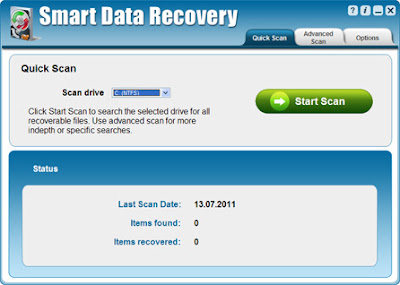 |
| Smart Data Recovery 3.0 |
With
Smart Data Recovery 3.0 you can recover deleted, destroyed and damaged data with just one click! You'll also be able to preview your files before recovering them to make sure they are the correct files or photos. Regardless of whether you accidentally deleted a file folder, spreadsheet, photo album or even the contents of a flash drive or mp3 player, Smart Data Recovery will be able to help you retrieve those files instantly.
Features & Benefits :
- Recover lost or deleted documents instantly
- Find missing or deleted pictures and images
- Recover lost songs, videos and audio files
- Search and recover files from your PC, memory card, iPod and other media
- Preview all files before you recover them
- Fast, safe and easy to use
System Requirements :
Windows XP, Windows Server 2003, Windows Vista 32-bit, Windows Vista 64-bit, Windows XP 64-bit, Windows 7 64-bit, Windows 2008 Server, Windows 2008 Server 64-bit, Windows 2003 Server 64-bit, Windows 7 32-bit
Download Smart Data Recovery 3.0


 Previous Entries


