By MagzSoftware
Monday, March 5, 2012
One of the things that cause
your computer works slowly is a bad hard drive fragmentation. To solve this issue you need a defragment tool which has powerful features and provide optimal results for the
performance of your computer. One of the best defragment tool is
Disk Defrag Pro from
Auslogics.Com. This
defragmenter is an essential hard drive optimization and maintenance tool for your PC. The program defragments files, consolidates free space and optimizes file placement on disks, making your system and applications operate faster.
 |
| Auslogics Disk Defrag Profesional |
Why you should use Disk Defrag Pro.? Disk Defrag Pro can increase file accsess speed, meaning that just about everything on your PC will work faster. With its 4 different algorithms for intelligent file placement, your hard drive will always run at its top speed. You can use the
Optimize by Access Time method when you want to have faster access to frequently used files. In order to speed up your system loading and application startup, use the
Optimize by Prefetch Layout algorithm. If you just want to reduce further file fragmentation, then choose
Optimize by Change Time. And finally, the
Optimize by Disk Zone algorithm allows you to manually specify which file types or even individual files should be written to the faster part of the disk. I think with its 4 Optimization Algorithms make Disk Defrag Pro become a smarter
defragmenter.
Disk Defrag Pro allows you defrag every single file, including crucial system files than are normaly locked by Windows. And not only defrags, but you can also prevent further fragmentation by leaving free space after specified files. As a cleaner Disk Defrag Pro will remove temp files and check disks for errors, with this option you can make faster and safer defragmentation for your hard drive.
With its defragmentation wizard, you can decide which defrag algorithm to choose. This wizard option allow you to identify best defrag methods for your PC. Speed improvements and disks' state can now be easily tracked through detailed reports and
performance charts. With its other sophistication, you can limit the use of system resources by the defrag process when you're at your PC, or lift any restrictions for faster defrag.
Generally, I think Disk Defrag Pro is powerful and flexible
defragmenter. It can help you to increase the
performance of your PC. There're many
defragmenter out there, and I suggest you to pick this one as an alternative. For more information about Disk Defrag Pro you can visit
Auslogics.Com now, you'll find many advanced features about this defragmenter
overthere.!
System Requirements :
- Windows 7/Vista/2008/XP (32-bit & 64-bit)
- 25 MB available hard disk space
- 512 MB RAM
What new in version 4.0.0.40 (09/02/2012) :
- Added an option "Do not show splash screen"
- Changed an issue connected with incorrect calculations of a defragmenation progress
- Fixed mistakes in a language file
- Now an information panel can be decreased
- Fixed minor bugs
By MagzSoftware
Saturday, March 3, 2012
You must agree that a slow computer is very boring. Definitely a lot of factors that cause it can happen. In addition to hardware problems that are not able to work optimally, it can also be caused by other things such as star-up the overload, spyware, corrupted registry, bad hard drive fragmentation, poor security software, remnants of uninstalled programs, the page file, too many windows and temporary files, viruses, etc.
 |
| WinSuite 2012 |
In addition you will also bothered if you lose your data, privacy leaked, or forgotten password. The question is how much time should you spend to make the diagnosis of all these problems.? Or instead you will feel stress.? But don't worry, if you use
WinSuite 2012 you will be able to handle all the problems we mentioned earlier easily. You don't need to spend much time because WinSuite 2012 can fix them all for you in minutes.
Main features of WinSuite 2012 :
WinSuite 2012 has many features for the maintenance of your windows, they're include:
- PC Clean & Tuneup - WinSuite 2012 allows you do 1-click PC Health Check with 360° scanning system, diagnose your PC and provide detailed suggestion on system performance optimization according to the detection. This suite also can speed up your windows, optimize windows startup items, windows service items and Internet items. And if you had any problems with windows registry, you can use WinSuite 2012 to scan and clean the registry, keep it thin and safe, clear junk files to make the computer run fast, strengthen the security of Internet activity, erase computer footprints to protect privacy, uninstall stubborn software and remove unused plug-ins to make your browser faster.
- Data Recovery - This tool allows you to recover different kind of files fully, such us documents, archives, emails, photos, videos and audio files with preview before recovery. You also can recover data deleted by Shift + Delete or emptied from Recycle Bin, lost from corrupted or formatted partitions. And this is another greatness of this tool, you can recover data from various devices, retrieve them lost from internal hard drive, USB drive, external hard drive, mobile phone, digital camera, iPod, MP3/MP4 player, and other storage media.
- Password & Key Finder - Password Finder allows you to find out almost all hidden passwords for your Windows Live, MSN, Hotmail, Outlook, Gmail, Yahoo, Windows auto logon, IE AutoComplete, dial-up and more. Moreover, you can find your Windows product ID and key for your reinstall. Don't hesitate because you can find Office key back too (for Office 2000, XP, 2003, 2007 and 2010).
- Disk Manager - Making cloning disk / partition is no longer a difficult issue, because with WinSuite 2012 you can clone partitions or the entire disk including Windows, programs, files and personal settings to another partition or disk. Organize your partition or disk effectively by resizing, deleting, formatting, hiding, splitting or merging. WinSuite 2012 facilitates you to do easy backup & restore file, folder, partition or disk for 1-click restore when they are lost or damaged.
- Privacy & Security - WinSuite 2012 can create a “personal safe” place on the disk for personal stuff that you are the only person allowed to access. With its privacy cleaner you can make securely delete online Internet tracks and program activity records stored in your browser, recent documents and records on the hard drive, start menu, etc. Moreover, you can encrypt your personal data to stop unauthorized access, or permanently shred files beyond recovery even with recovery software.
 |
| WinSuite 2012 Interface |
What's New in Version 7.0.1 :
- New interface providing a better user experience;
- Integrated with Wondershare Data Recovery 2.0;
- Integrated with Wondershare Disk Manager Free 1.0;
- Integrated with Wondershare 1-Click PC Care 7.4;
- Upgraded Password Finder function and supported IE 7/8/9;
- Fixed some minor bug for better using.
System Requirements :
- Supported OS: Windows 7/Vista/XP 32/64 bit
- Processor: >750MHz Intel or AMD CPU X86(32bit) or X64(64bit)
- Free Hard Disk Space: 1GB or more
- RAM: 512 MB or above
So according to my conclusions, WinSuite 2012 is perfect suite for your computer who need extra care. With its complete features makes WinSuite 2012 is one of the suites are quite powerful and I recommend it to you.
By MagzSoftware
Thursday, February 16, 2012
Slow computer?
PC Health Advisor is the digital doctor you need to scan, find, and fix. It packs advanced tools into one easy-to-use program so you can completely protect and clean your computer. PC Health Advisor includes a registry cleaner, malware detection and removal, privacy files cleaner, duplicate file finder, restore point manager, Startup Manager, BHO Manager, process manager and Windows system settings optimizer.
 |
| ParetoLogic PC Health Advisor |
This innovative software boasts a comprehensive suite of tools to optimize, clean, maintain and even protect your computer. It easily fixes common errors that can plague your computer and clears away files that clutter and slow down your system. PC Health Advisor is no regular utility program.
Exciting new benefits and features:
- Customize it for Your Needs - PC Health Advisor has so many great tools that each user is going to have their favourites. You can now pick which tools are at your fingertips, by customizing the "Home" screen. As well, you can easily choose components you would like scanned: drivers, processes, registry and privacy.
- Improved Privacy - Always seeking to serve all computer users, the ParetoLogic team is pleased that PC Health Advisor now has improved Chrome browser support so that it can delete all of the associated privacy files.
- At Your Service - We are here to help! If your PC cannot open a file, PC Health Advisor will automatically launch. Then, with the handy File Extension Manager, you can search for the software to open that particular file extension.
- Alerting You - PC Health Advisor keeps track of the health of your computer. If disk defragging is needed to boost speed and performance, PC Health Advisor will automatically notify you of this important information.
Requirements :
- Windows® 7 32-bit and 64-bit Operating System.
By MagzSoftware
Tuesday, January 31, 2012
Your computer is like a small office but can do so much work. Activities that you do using a computer, whether it be offline or online course will cause changes in the configuration of the operating system (i.e. Windows) you use. These changes are caused by several factors, for example if you frequently install or uninstalling software on your computer, it would surely have caused a change, one of which is a registry. Keep in mind the process of uninstalling which do usually still leave Unwanted registry, and if it is allowed to continue will create an increased burden on your computer's memory. So do not be surprised if many users are always install a registry cleaners that they can use for regular registry maintenance.
| Wondershare Time Freeze 2.0 |
Another example, configuration changes on the operating system is often due to carelessness in the use of computers, whether it be working offline and online that doesn't mean secure against virus threats. It is very important to get our attention, therefore, attach your favorite anti-virus, in order to minimize the threats. A more severe threats could also come up when you use your computer for online activities, among others, the threat of viruses, spyware, trojans, and other malware attacks.
It is undeniable that the use of computers is now oriented towards online activities. One fact is, you can't socialize with other peoples by using Twitter or Facebook if you're not online can you.? And remember comrades, security threats to your computer can also be started from social networking as I mentioned. This is my story, I often get the fake links on Facebook that contain viruses, spyware or other types of malware. Therefore, be careful if there is someone who sends you a particular link (e.g. download link) or ads link to your facebook wall, you don't make directly click on that link, please be sure that the links are safe.
Well, it would be too long if we talk about the threats. Now our task is how to increase healthy behaviors in using the computer either online or offline. In addition to installing antivirus, we can also choose other third party software as an alternative that can secure our computer systems.
This time we will review on Time Freeze 2.0. Time Freeze 2.0 is a software that can be used by users that aims to minimize the threat to their operating system. The interesting thing is the Time Freeze 2.0 can be a virtual system software that can create a virtual environment. Users who make any activities through this virtual environment will make the real system more secure. Only with 2 clicks and without rebooting, you already enter a virtual system, so you don't to worry while surfing on the internet. With this virtual system you can also evaluate each application and do whatever you like as on the real system, while in the real system remains safe, no change at all.
Time Freeze 2.0 is not like any other antivirus software, but when you do your activities with this virtual system, the threats such us viruses, spyware, worms, trojans and other will not happen to your real system. When you reboot you computer, all data produced by this virtual system, such as those infected with viruses, spyware, trojans and internet history will vanish like nothing has happened. Time Freeze 2.0 is a fortress which is outside of the fort else that can make real system in your Windows becomes more secure.! The other advantages of Time Freeze 2.0 include:
- New Physical Memory Buffer Mode: when users enable System Protection in Time Freeze 2.0, they can apply this Physical Memory Buffer Mode, which can first speed up virtual system performance at least 60%, and second minimize the frequency of writing/reading hard disk and prolong its service life.
New MBR protection: protect the boot sector of the main hard disk to guarantee the normal startup of computer.
New USB protection: prevent virus/malware threats from USB sticks to infect your computer, and prevent authorized users to copy your important files using USB sticks.
Improved Folder Protection: the software kernel of Folder Protection is rewritten in order to bring stronger defense against threats of virus/spyware and keep protected files safe and clean.
Auto hide system tray icon: annoyed by the flashing system tray icon? It is gone in Time Freeze 2.0. Users can also press hot key (Ctrl+Alt+F8) to hide/show the icon.
Revolutionary new interface: the interface of Time Freeze 2.0 is a completely new design with the same logic and improved intuitiveness and appearance.
More flexible options: with Time Freeze 2.0, it is more flexible to save/discard virtual system data when return to the real system; it is also possible to set different protection mode for different folders.
Virtual system as the shadow of the actual system.
Simply reboot computer to return to the original state. Eliminates cost for system maintenance.
Surf internet safely, and play around with computer with NO trace left.
Manage the program with a custom password setting and keep inexperienced users from making change to your settings and configures.
Siytem Requirement :
- Another advantage of the Time Freeze 2.0 : While Time Freeze 1.0 is only compatible to 32-bit OS, Time Freeze 2.0 added support to 64-bit OS including Windows 7, XP, Vista and Windows 2000, so as to satisfy users of 64-bit OS.
So many advantages already mentioned above when you use Time Freeze 2.0. Although it doesn't support yet for other operating systems like Mac and Linux, but you can try it. Please visit the vendor of Time Freeze 2.0 and download it for free trial.
By MagzSoftware
Friday, January 6, 2012
Not every user give their serious consideration to care their PC, then the PC often having problems. But many users do routine maintenance on their PC but the softwares that they use are expensive, and for this is not all users can buy.
Comodo System Utilities utilizes the patent-pending technology of SafeDelete to safely recover any files deleted in error, eliminating the risk from the process of PC cleaning. Fear no longer: Comodo System Utilities is here, and it's completely free.
 |
| Comodo System Utilities |
With Comodo System Utilities, users can make a deep registry cleaning on their PC, Windows will be able to access the information it needs from the registry more quickly, boosting both performance and stability. And then this tool will eliminate the clutter inevitably built up over time in your disk drive to free up space and improve performance.
For Clean-up scheduling, enter when you'd like Comodo System Utilities to perform a deep clean so it's convenient for you. Then you can use - SafeDelete™ and Registry Protection - these features to backup all your files before cleaning. When cleaning is complete, you’ll be able to make sure your PC is in perfect condition before deleting for good. Moreover, for privacy cleaning, Comodo System Utilities will cear out your digital trail (cookies, cache, browsing history, and more) with the privacy cleaner to keep your private information out of the hands of others.
Comodo System Utilities features:
- Windows registry cleaner identifies, removes or repairs any unnecessary or corrupted entries
- Disk cleaner removes all the clutter from your disk drive to free up space and improve performance
- Privacy cleaner deletes cookies, cache, history, and usage records, helping to protect your privacy and identity
- SafeDelete™ lets Comodo System Utilities clean as deeply as possible without fear of removing something vital to your PC's performance
System Requirements :
- 32 MB Ram
- 20 MB Disk Space
- Windows 7 - 32 or 64 bit
- Windows Vista - 32 or 64 bit
- Windows 2003 - 32 or 64 bit
- Windows XP - 32 or 64 bit
Go to
Download
By MagzSoftware
Tuesday, December 27, 2011
Advanced SystemCare PRO from IObit is a great set of PC system utilities that does exactly what it set out to do : get your computer up to speed and keep it running with optimum performance. Complete with a variety of superb features, Advanced SystemCare is a great option for keeping your PC running like new." Advanced SystemCare is an easy-to-use, quick system analyzer and optimizer that fixes the most common computer problems and can make your PC faster and more stable."
 |
| Advanced SystemCare PRO 5 |
Advanced SystemCare PRO provides an always-on, automated, all-in-one PC Healthcare Service with anti-spyware, privacy protection, performance tune-ups, and system cleaning capabilities. This powerful and award-winning precision tool fixes stubborn errors, cleans out clutter, optimizes Internet and download speeds, ensures personal security, and maintains maximum computer performance automatically.
Why Is Advanced SystemCare PRO 5 Different ?
- Provides a Complete Solution For PC Top Performance.
- Finds and Detects More Hidden Problems of Security and Performance.
- Simpler and Easier to Use.
- Proven by More Users.
Key Benefits :
- Keeps your PC running at peak performance Enhanced
- Defends PC security with extra protection Enhanced
- One click to solve as many as 10 common PC problems Enhanced
- Real-time optimization with ActiveBoost function New!
- More than 20 dedicated smart tools for everyday PC maintenance Enhanced
- Cloud technology to keep database up-to-date New!
- Boost your PC for working and gaming Enhanced
- Next-generation registry deep clean and optimizer Enhanced
- Automatically works in the background
- New UI technology for quicker start and less resource usage New!
- New architecture and re-written source codes for 32bit/64bit system New!
- Improved Care module with more powerful clean and optimization functions Enhanced
- Powerful hard drive defragmentation
System Requirements :
Operating Systems
- Microsoft® Windows® 8
- Microsoft® Windows® 7 (32-bit and 64-bit) Starter/ Home Basic/Home Premium/Professional/Ultimate
- Microsoft® Windows® Vista (32-bit and 64-bit) Starter/Home Basic/Home Premium/Business /Ultimate
- Microsoft® Windows® XP (32-bit and 64-bit) with SP2/SP3 or Home/Professional/Media Center
- Microsoft® Windows® 2000
Hardware :
- 300 MHz processor or faster processor
- 256 MB of RAM
- 30 MB of free hard disk space
Go to
Download
By MagzSoftware
Tuesday, December 13, 2011
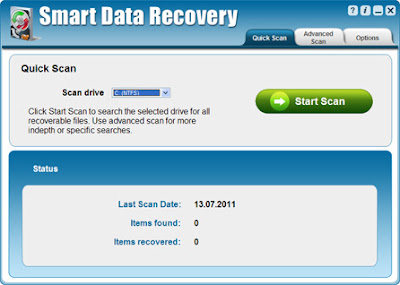
Recovering missing or deleted files can be complicated, time consuming and if you choose the wrong data recovery program you risk permanently loosing those files. Smart Data Recovery is an easy to use, safe solution that will enable even the most novice computer user to quickly recover missing files.
 |
| Smart Data Recovery 3.0 |
With
Smart Data Recovery 3.0 you can recover deleted, destroyed and damaged data with just one click! You'll also be able to preview your files before recovering them to make sure they are the correct files or photos. Regardless of whether you accidentally deleted a file folder, spreadsheet, photo album or even the contents of a flash drive or mp3 player, Smart Data Recovery will be able to help you retrieve those files instantly.
Features & Benefits :
- Recover lost or deleted documents instantly
- Find missing or deleted pictures and images
- Recover lost songs, videos and audio files
- Search and recover files from your PC, memory card, iPod and other media
- Preview all files before you recover them
- Fast, safe and easy to use
System Requirements :
Windows XP, Windows Server 2003, Windows Vista 32-bit, Windows Vista 64-bit, Windows XP 64-bit, Windows 7 64-bit, Windows 2008 Server, Windows 2008 Server 64-bit, Windows 2003 Server 64-bit, Windows 7 32-bit
Download Smart Data Recovery 3.0
By MagzSoftware
Sunday, December 11, 2011
Glary Utilities is a freeware with registry and disk cleaning, privacy protection, performance accelerator and amazing multifunctional tools. It can fix dogged registry errors, wipe off clutters, optimize internet speed, safeguard confidential files and maintain maximum performance.
It is designed for both novice and professionals. User-friendly interface shows clear & detailed directions. For novice, all work can be done with just 1 or 2 clicks, while for professionals, abundant options are available.
To call Glary Utilities helpful would drastically understate the situation. It hopes to become your INDISPENSABLE friend with its one-stop-shop utilities for optimizing and maintaining your PC for best performance. My friend, welcome to have a try for Glary Utilities and have your say!
Operating System : Windows 7, 2000, XP, Vista. 32/64bit version.
Go to
Download (Free)
By MagzSoftware
Saturday, December 10, 2011
Most computers encounter the following common problems. When the computer is new, it runs fast at first,and then months later it is running very slow. It takes long time to startup, to load websites or run programs. Or you may find that your computer freezes and stops response, or pop up unknown error messages or the programs just become dead suddenly.
TuneUp360 can auto scan and fix your computer errors with only one click. It is a kind of software which is specially designed for home users and busy people. You won't need to be a computer master. With just one click, you will get a fast, stable and secure computer. You can simply use it to make your computer away from slowness, errors and freezes.
TuneUp360 optimizes and boosts your Windows performance & Internet connection; repairs and cleans your registry and system; eliminates Windows freeze and hang; remove stubborn and ghost programs; cleans up obsolete debris and trace files; boost your Windows startup time; optimizes your network speed.
Go to
Download
By MagzSoftware
Thursday, December 8, 2011
What's in your computer? If you're like most of us, you can probably name the processor (Intel or AMD, Celeron or Pentium), maybe how much RAM it has, and maybe how big the hard drive is.
When you go to a computer store and see all the bright shiny PCs laid out next to each other, most will have tags or stickers indicating the:
- Processor brand and model
- Hard drive size and speed
- Amount of memory (RAM)
- Graphics card
- Operating system
Two or three years later, when it comes time to upgrade your computer, that tag or sticker may be long gone. Speccy was designed as a free electronic "what's inside" sticker for your PC.
Isn't this information in Windows?
Yes and no. Some of the basic information can be found by right-clicking My Computer and then clicking Properties. The General tab lists some statistics, and the Device Manager on the Hardware tab lists all of the hardware you've got installed. But it misses out lots of information that you need.
Speccy will give you detailed statistics on every piece of hardware in your computer. Including CPU, Motherboard, RAM, Graphics Cards, Hard Disks, Optical Drives, Audio support. Additionally Speccy adds the temperatures of your different components, so you can easily see if there's a problem!
Why do I need Speccy?
At first glance, Speccy may seem like an application for system administrators and power users. It certainly is, but Speccy can also help normal users, in everyday computing life.
If you need to add more memory to your system, for example, you can check how many memory slots your computer has and what memory's already installed. Then you can go out and buy the right type of memory to add on or replace what you've already got.
If you're going to be selling your PC, you can use Speccy to quickly list out the components. Or, if you're buying a PC, you can use Speccy to check that the computer has what the label says it has.
Also, Speccy comes in handy for support. If you're on the phone with technical support and they want to know what video card you have installed, there's no need to hunt around Windows. Speccy has all the information on one easy-to-understand screen.
Go to
Download




 Previous Entries


